Managing your own server and website doesn’t have to be complicated. With aaPanel, you get a hosting control panel designed to make your life easier.
Imagine having all the tools you need right at your fingertips—simple, efficient, and reliable. Whether you’re a beginner or have some experience, aaPanel’s features help you take control without the usual headaches. Ready to discover how aaPanel can transform your hosting experience? Dive into the must-know features that put you in charge. Check out aaPanel here: aaPanel Hosting Control Panel
Credit: www.aapanel.com
Introduction To Aapanel Hosting Control Panel
Aapanel is a simple and powerful hosting control panel. It helps users manage their servers and websites easily. The interface is clean and easy to navigate. This makes it perfect for beginners and experts alike.
With Aapanel, managing server tasks becomes faster and less technical. It offers many features that automate routine jobs. This helps save time and reduce errors. The control panel supports multiple web services and software installations with just a few clicks.
What Is Aapanel And Its Core Purpose
Aapanel is a free, open-source hosting control panel. It is designed to simplify server management. The core purpose is to offer a user-friendly platform for managing websites and servers.
Aapanel supports popular web servers like Apache and Nginx. It also manages databases such as MySQL and MariaDB. Users can install SSL certificates, configure firewalls, and monitor server status easily.
Its main goal is to reduce the technical barriers in server setup and maintenance. This allows users without deep technical knowledge to manage hosting tasks efficiently.
How Aapanel Simplifies Server Management
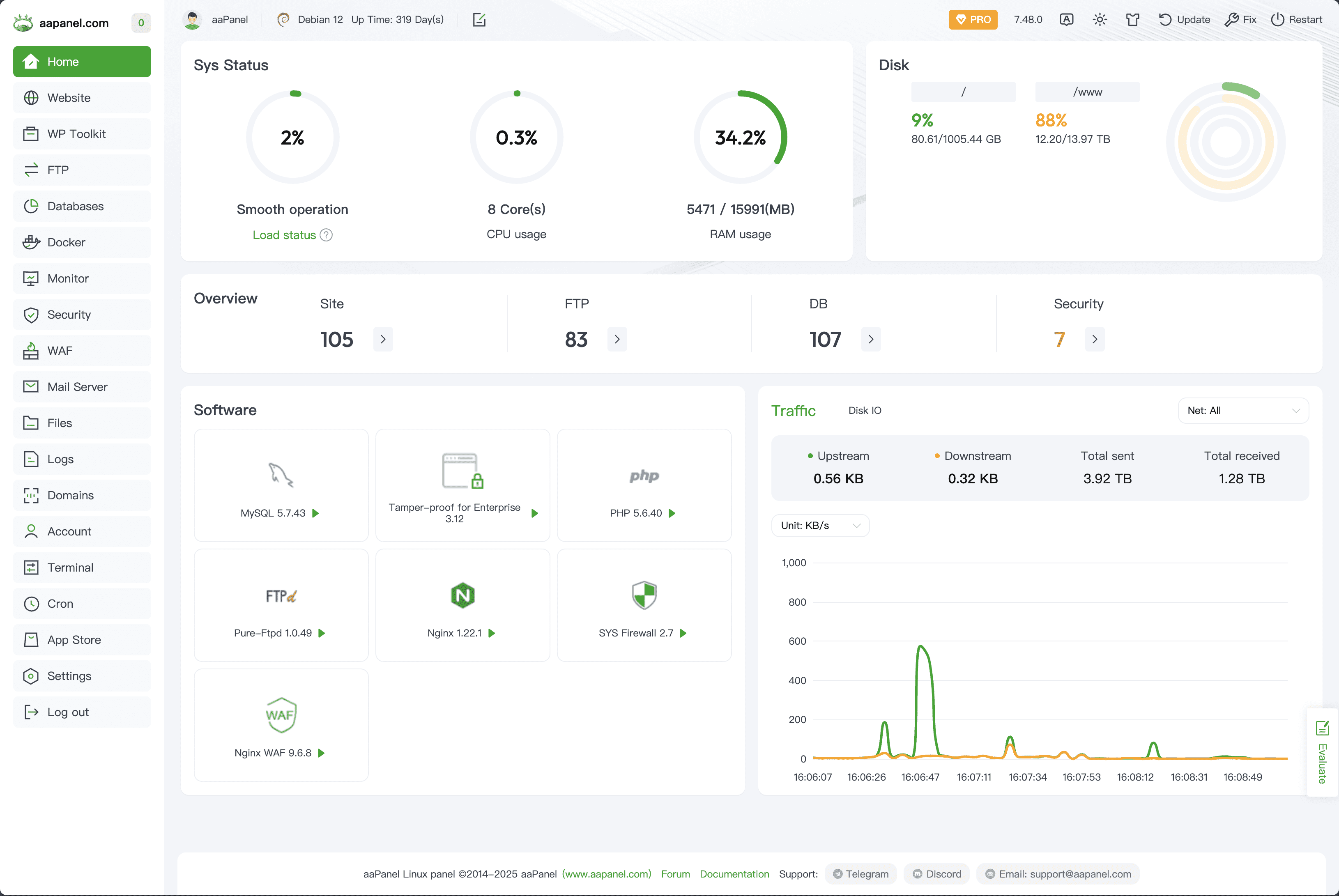
Aapanel uses a clean dashboard with easy controls. It provides one-click installation of many apps and services. This removes the need to use complex command-line tools.
- One-click software installation: Install WordPress, PHP, MySQL, and more.
- Real-time monitoring: View CPU, memory, and bandwidth usage in simple graphs.
- Security management: Enable firewalls, SSL, and manage backups with few clicks.
- File management: Upload, edit, and manage files directly from the panel.
- Automated tasks: Schedule backups and updates to run automatically.
The control panel reduces manual effort and errors. It lets users focus on their websites rather than server details. The clear interface makes it easy to find and use all functions quickly.
Key Features Of Aapanel And Their Benefits
aaPanel offers a suite of essential features designed to simplify server and website management. These features focus on improving control, security, and efficiency for users of all skill levels. The panel’s design keeps tasks straightforward while providing powerful tools for hosting management. Below are the key features and the benefits they bring to your hosting experience.
User-friendly Interface For Efficient Control
aaPanel’s interface is clean and intuitive. It uses clear menus and icons to help users navigate easily. Even beginners can manage servers without confusion.
- Simple navigation: Find settings quickly without technical jargon.
- Dashboard overview: Monitor server status at a glance.
- Customizable panels: Arrange tools to match your workflow.
This ease of use reduces management time and lowers errors.
One-click Application Installs To Save Time
Installing applications is fast and effortless with aaPanel’s one-click feature. Popular apps like WordPress, Joomla, and databases install in seconds.
| Application | Benefit |
|---|---|
| WordPress | Instant website setup without manual steps |
| MySQL | Easy database installation and management |
| PHP | Quick environment setup for web apps |
One-click installs save time and avoid mistakes during setup.
Comprehensive Security Tools To Protect Your Server
Security is a priority with aaPanel. It includes multiple tools to keep servers safe from attacks.
- Firewall management: Block unwanted traffic easily.
- SSL certificate integration: Enable HTTPS with simple steps.
- Brute force protection: Prevent unauthorized login attempts.
- Security monitoring: Receive alerts about suspicious activities.
These tools enhance server protection without complex setup.
Real-time Monitoring And Performance Insights
aaPanel provides live data on server performance. Users see CPU, memory, and bandwidth usage instantly.
- Resource tracking: Monitor usage to avoid overload.
- Process management: Identify and stop heavy tasks.
- Logs and reports: Access historical data for troubleshooting.
Real-time insights help maintain smooth server operation.
Automated Backup Solutions For Data Safety
Backups run automatically with aaPanel. This protects data from accidental loss or server failure.
- Scheduled backups: Set daily, weekly, or custom intervals.
- Remote storage: Save backups to cloud or external servers.
- Easy restore: Quickly recover data with few clicks.
Automatic backups reduce risks and ensure data safety.
Multi-server Management For Scalable Hosting
Manage several servers from one aaPanel dashboard. This feature supports growth and scaling.
- Centralized control: Handle multiple servers without switching accounts.
- Consistent settings: Apply configurations across all servers easily.
- Resource distribution: Balance workloads for better performance.
Multi-server management simplifies hosting expansion.
Pricing And Affordability Of Aapanel
Aapanel offers a flexible pricing structure that suits various users. Whether managing a personal blog or a small business server, users find options fitting their needs and budgets. The control panel balances cost and features well, providing good value.
Free Vs Paid Options: What’s Included
Aapanel provides a free version with essential features for basic server and website management. This version includes:
- One-click software installation
- Basic security tools
- Server monitoring
- Simple website management
The paid plans add advanced functions such as:
- Priority support
- Automated backups
- Enhanced security options
- Multiple user management
Users can start free and upgrade only when advanced features are necessary.
Cost-effectiveness Compared To Other Control Panels
Aapanel’s pricing is competitive. Many control panels charge high monthly fees. Some require costly licenses for basic tasks.
Aapanel’s free plan covers most basic needs. Paid plans are affordable and provide more value. This pricing suits users who want control without high costs.
| Control Panel | Free Plan | Starting Paid Price | Main Benefit |
|---|---|---|---|
| Aapanel | Yes | $5/month | Good features at low cost |
| cPanel | No | $15/month | Industry standard, expensive |
| Plesk | No | $12/month | Good UI, higher price |
Value For Small Businesses And Individual Users
Small businesses and individual users benefit from Aapanel’s pricing. The free version reduces initial costs. Paid plans grow with their needs.
It supports easy server setup and website control. Users save money on expensive licenses.
- Low entry cost
- Scalable features
- Simple interface
- Good support options
Aapanel fits budgets of startups and solo developers well.
Credit: www.cloudpanel.io
Pros And Cons Based On Real-world Usage
The aaPanel Hosting Control Panel stands out for its user-friendly design and powerful features. Users share varied experiences that highlight both its strengths and areas for improvement. This section breaks down the key benefits, common challenges, and community feedback from actual users.
Advantages Users Appreciate Most
- Simple Installation: Many users praise aaPanel for its easy setup process. It requires minimal technical knowledge.
- Intuitive Interface: The clean and clear dashboard helps beginners manage servers without confusion.
- Comprehensive Features: It supports website management, database control, SSL setup, and backups in one place.
- Lightweight and Fast: Users note its low resource consumption and quick response time.
- One-Click App Deployment: Installing common web applications is straightforward and fast.
- Free and Open Source: No licensing fees, which is appreciated by small businesses and developers.
Common Challenges And Limitations Encountered
- Limited Advanced Security Features: Some users find built-in security options basic and rely on external tools.
- Occasional Bugs: Updates sometimes introduce minor bugs, affecting stability temporarily.
- Less Suitable for Large Enterprises: The panel may lack advanced scalability needed for huge server setups.
- Documentation Gaps: Beginners report that official guides can be unclear or incomplete in some areas.
- Language Support: While improving, non-English users may face occasional translation issues.
User Feedback And Community Support Overview
The aaPanel community is active and growing. Forums and social media groups provide quick help and shared tips.
| Aspect | User Feedback |
|---|---|
| Support Response | Mostly fast replies from official and community helpers |
| Community Activity | Regular discussions, problem-solving, and feature requests |
| Resource Availability | Plenty of tutorials, videos, and blog posts from users |
| Overall Satisfaction | Positive for small to mid-size projects; mixed for complex needs |
Users value the support network for troubleshooting and learning. The community helps fill documentation gaps and speeds up problem resolution.
Ideal Users And Use Case Recommendations
aaPanel offers a simple and clear hosting control panel designed for various users. It fits different needs, from beginners to professionals. Understanding who benefits most helps choose the right tool.
Best Fit For Beginners And Non-technical Users
aaPanel features a user-friendly interface that requires no advanced skills. Beginners can manage websites and servers easily without command-line knowledge. It provides:
- One-click software installation
- Visual file and database management
- Clear monitoring dashboards
- Simple security settings
These features reduce confusion and save time. Users can focus on their site content instead of technical setup.
Suitability For Small To Medium-sized Businesses
Small and medium businesses find aaPanel practical and affordable. It supports multiple websites and domains on one server. Key benefits include:
| Feature | Benefit |
|---|---|
| Multi-site management | Run several websites efficiently |
| Resource monitoring | Track server health and usage |
| Backup tools | Protect data with scheduled backups |
| Security controls | Manage firewalls and SSL certificates |
These features help businesses keep websites stable and secure without hiring experts.
Recommendations For Web Developers And Hosting Providers
aaPanel suits developers and hosting services needing control and flexibility. It supports:
- Custom script deployment
- Easy server environment setup
- Automation through APIs
- Integration with common web technologies
Developers can quickly test and launch projects. Hosting providers can offer clients a simple panel with powerful features.

Credit: www.threads.com
Frequently Asked Questions
What Is Aapanel Hosting Control Panel?
Aapanel is a free, open-source hosting control panel. It simplifies website management with a user-friendly interface. It supports web server setup, database management, and security features. Aapanel is ideal for both beginners and professionals managing Linux servers.
How Does Aapanel Improve Server Management?
Aapanel streamlines server management by automating tasks like software installation. It offers easy control over websites, databases, and FTP accounts. Its intuitive dashboard allows quick monitoring of server status and resource usage. This reduces the complexity of manual server administration.
Which Security Features Does Aapanel Provide?
Aapanel includes firewalls, SSL certificate management, and backup options. It enables easy configuration of security rules to protect websites. Regular updates and monitoring tools help maintain server safety. These features ensure a secure hosting environment for users.
Can Aapanel Support Multiple Websites?
Yes, Aapanel supports managing multiple websites on one server. Users can create, configure, and monitor several domains easily. It allows separate database and FTP account management for each site. This makes Aapanel suitable for hosting providers and developers.
Conclusion
AaPanel offers a simple way to manage your server and websites. It has easy tools for beginners and experts alike. You can install software, control databases, and handle files quickly. The interface keeps things clear and organized. It saves time and reduces headaches. Try aaPanel to make hosting easier and smoother. Learn more about aaPanel here: https://glinthive.com/aaPanel.