Choosing the right hosting control panel can make or break how smoothly you manage your website and server. If you’ve been wondering whether to go with the popular cPanel or try something new like aaPanel, you’re in the right place.
This comparison will help you see which one fits your needs better—whether you want simplicity, powerful features, or cost-effectiveness. Imagine saving time and avoiding headaches every time you update your site or manage your server. Ready to find out which control panel can give you that peace of mind? Let’s dive in. If you want to explore aaPanel right away, check it out here: aaPanel – a user-friendly hosting control panel that makes managing your server easier than ever.
Introduction To Aapanel And Cpanel
Choosing the right control panel is crucial for managing web hosting effectively. Aapanel and Cpanel are two popular options. Both offer tools to control servers and websites. Understanding their features helps users make the best choice.
Overview Of Aapanel And Its Purpose
Aapanel is a free, open-source hosting control panel. It simplifies server management with a clean, easy-to-use interface. Users can install software, manage databases, and monitor server performance.
Aapanel supports multiple Linux distributions. It is designed for those who want more control over their servers without complex commands. Its main goal is to make server management accessible to beginners and experts alike.
- Easy installation of popular web services
- One-click software deployment
- Real-time server monitoring
- Secure user management
Understanding Cpanel And Its Role In Web Hosting
Cpanel is a widely used, commercial web hosting control panel. It offers a graphical interface to manage hosting accounts and websites. Hosting providers often include Cpanel with their services.
Cpanel supports tasks like email setup, file management, domain management, and security settings. It suits both beginners and professionals who want a stable and well-supported platform.
- Robust security features
- Wide compatibility with hosting providers
- Extensive documentation and support
- Automated backups and updates
Why Comparing Aapanel And Cpanel Matters For Web Hosting Users
Choosing between Aapanel and Cpanel affects ease of use, cost, and functionality. Both offer similar core features but differ in price and user experience.
| Feature | Aapanel | Cpanel |
|---|---|---|
| Cost | Free | Paid License |
| Ease of Use | User-friendly, simple UI | Professional, feature-rich UI |
| Support | Community-based | Professional Support |
| Compatibility | Linux servers | Linux servers, widely supported |
| Features | Basic to moderate server control | Advanced hosting management |
Understanding these differences helps users pick a control panel that fits their needs. This comparison aids in saving time and resources.
Key Features Of Aapanel
aaPanel offers a range of features designed to simplify server and website management. It focuses on user-friendliness and security while providing powerful tools for efficient control. These features make aaPanel a practical choice for both beginners and experienced users.
User-friendly Interface And Ease Of Use
aaPanel provides a clean and simple dashboard. The interface uses clear icons and menus for easy navigation. Users can manage servers without complex commands or technical skills.
The panel supports multiple languages and offers quick access to common tasks. This helps users save time and reduces errors during management.
Integrated Security Features For Enhanced Protection
aaPanel includes built-in security tools that protect servers from threats. It offers:
- Firewall management to block unwanted traffic
- One-click SSL installation for secure connections
- Login protection and IP blocking to prevent unauthorized access
These features help keep websites and data safe with minimal effort.
One-click Software Installations And Management
aaPanel allows installing popular software quickly. Users can set up web servers, databases, and PHP versions with just one click.
Common software available includes:
| Software | Purpose |
|---|---|
| Apache/Nginx | Web server management |
| MySQL/MariaDB | Database management |
| PHP | Server-side scripting |
This feature simplifies server setup and software upgrades.
Resource Monitoring And Server Management Tools
aaPanel provides real-time monitoring of server resources like CPU, memory, and disk usage.
The tools include:
- Process management to track and control running tasks
- Log viewing for troubleshooting errors
- Backup and restore options for data safety
These tools help maintain server health and performance effectively.
Key Features Of Cpanel
cPanel stands out as a widely used web hosting control panel. It offers a rich set of features designed to simplify server management. Users gain access to powerful tools for website, email, and database control. The interface is user-friendly and supports both beginners and experienced administrators.
Comprehensive Control Panel With Advanced Functionality
cPanel provides a centralized dashboard to manage all hosting tasks. The interface includes sections for:
- File management through a built-in file manager
- Database administration with MySQL and PostgreSQL support
- Domain and DNS management
- Software installation via auto-installers like Softaculous
- Resource monitoring and usage statistics
This setup allows users to control every aspect of their hosting environment without extra software. The advanced tools help with tasks like cron jobs, FTP account creation, and SSL certificate installation.
Robust Security And Backup Options
Security is a key focus in cPanel. It offers multiple layers of protection including:
- IP blocking and firewall configuration
- Two-factor authentication for account access
- SSL/TLS management for secure website connections
- Automated backups with easy restoration options
The backup system supports full and incremental backups. This ensures data safety and quick recovery after any loss or failure.
Extensive Compatibility With Hosting Services And Applications
cPanel supports a wide range of hosting environments and third-party applications. It works well with:
- Shared, VPS, and dedicated hosting servers
- Popular CMS platforms like WordPress, Joomla, and Drupal
- Email servers such as Exim
- Various PHP versions and programming languages
This compatibility makes cPanel a versatile choice for many web hosting providers and developers.
Automated Account And Email Management
Managing accounts and emails is simplified with cPanel automation. Features include:
- Automatic creation and suspension of user accounts
- Email account setup and spam filtering
- Mailing list management
- Forwarders and autoresponder configuration
These tools reduce manual work and help maintain smooth communication channels for websites.

Credit: www.youtube.com
Pricing And Affordability Comparison
Choosing the right control panel depends heavily on pricing and value. Cost affects both small projects and large businesses. Comparing aaPanel and cPanel reveals distinct differences in their pricing models. Understanding these helps decide which fits your budget and needs.
Aapanel’s Cost Structure And Free Usage Benefits
aaPanel offers a highly affordable solution. Its core control panel is free to use. This makes it ideal for users who want to manage servers without upfront fees.
- No license fees for basic use.
- Includes essential features without extra cost.
- Open-source nature allows customization.
Paid add-ons and plugins are optional. Users can expand functionality without mandatory expenses.
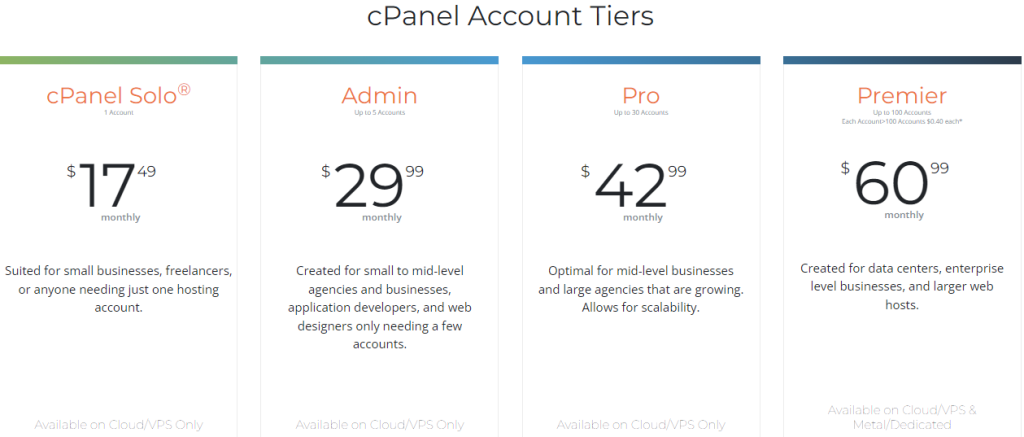
Cpanel’s Pricing Tiers And Licensing Fees
cPanel charges a license fee based on the number of accounts. Pricing tiers vary for small to large servers.
| License Type | Price Range (Approx.) | Accounts Included |
|---|---|---|
| Solo | $15/month | 1 account |
| Admin | $20-30/month | Up to 5 accounts |
| Pro | $30-45/month | Up to 30 accounts |
| Premier | $45+/month | Up to 100 accounts |
Additional fees may apply for features or support. Licensing adds to monthly or yearly costs.
Evaluating Cost-effectiveness Based On User Needs
Cost-effectiveness depends on project size and requirements.
- Small Projects: aaPanel suits users needing zero-cost setup.
- Medium to Large Projects: cPanel offers robust features but at higher cost.
- Technical Skill: aaPanel requires some server knowledge; cPanel is user-friendly but priced higher.
- Scalability: cPanel scales with business but raises license fees.
Choosing depends on balancing budget, features, and ease of use.
Pros And Cons Based On Real-world Usage
Choosing the right hosting control panel affects server management and website performance. Both aaPanel and cPanel offer unique features that fit different needs. Real users share insights on their strengths and weaknesses. This section breaks down their advantages and challenges from practical experience.
Advantages Of Using Aapanel In Various Hosting Environments
- User-friendly interface: Simple design helps beginners manage servers easily.
- Free and open-source: No licensing fees, ideal for budget-conscious users.
- Lightweight and fast: Uses fewer resources, improving server speed and efficiency.
- Supports multiple Linux distributions: Flexible for different server setups.
- One-click app installation: Quick setup for popular apps like WordPress and databases.
- Built-in security tools: Includes firewall and SSL management for safer hosting.
These features make aaPanel suitable for small businesses, personal projects, and developers wanting control without high costs.
Limitations And Challenges Faced With Aapanel
- Limited official support: Mainly community-based help, which can delay problem-solving.
- Fewer advanced features: Lacks some enterprise tools found in paid panels.
- Windows server support is missing: Only works on Linux, limiting platform choice.
- Interface updates are less frequent: Sometimes slower to add new features or fix bugs.
- Less compatibility with third-party plugins: Some add-ons may not work smoothly.
These challenges may affect users needing robust, high-scale hosting environments.
Strengths Of Cpanel In Professional And Enterprise Settings
- Comprehensive features: Offers advanced tools for email, DNS, backups, and databases.
- Wide third-party support: Compatible with many plugins and software.
- Strong security options: Includes IP blockers, SSL management, and malware scanning.
- Expert support and documentation: Access to professional help and detailed guides.
- Easy multi-user management: Suits teams with delegated access controls.
- Stable and mature platform: Proven reliability in large hosting companies.
cPanel fits businesses that need robust control and professional-grade hosting features.
Potential Drawbacks And User Concerns With Cpanel
- High licensing costs: Expensive for small projects or personal use.
- Resource heavy: Can slow down servers with limited hardware.
- Steeper learning curve: Complex interface may confuse beginners.
- Less customizable interface: Limited flexibility in layout and options.
- Closed source: No access to code limits user modifications.
These issues can deter startups and hobbyists seeking low-cost, simple solutions.

Credit: verpex.com
Ideal Users And Use Case Recommendations
Choosing the right control panel depends on your needs and skills. Both aaPanel and cPanel serve different users and situations. Understanding who benefits most from each helps avoid confusion and wasted effort.
Who Should Choose Aapanel: Beginners, Small Businesses, And Developers
aaPanel is perfect for those new to server management. Its simple interface makes it easy to start managing websites without deep technical knowledge.
- Beginners: Intuitive design and clear options reduce the learning curve.
- Small Businesses: Cost-effective with essential features for growing websites.
- Developers: Offers flexibility and control with open-source tools and easy customization.
The panel supports quick setup and basic server tasks. It suits users who want control without complexity.
Best Scenarios For Opting Cpanel: Large Enterprises And Managed Hosting
cPanel fits well in complex environments. It handles large-scale hosting with advanced features and strong support.
- Large Enterprises: Handles high traffic and multiple accounts smoothly.
- Managed Hosting Providers: Offers robust automation and security options.
cPanel integrates well with other enterprise tools. Its polished interface supports teams managing many sites.
Making The Right Choice Based On Technical Expertise And Hosting Goals
| Factor | aaPanel | cPanel |
|---|---|---|
| Technical Skill | Low to Medium | Medium to High |
| Budget | Free and Open Source | Paid with Licensing Fees |
| Feature Set | Basic to Moderate | Advanced and Extensive |
| Support | Community and Online Resources | Professional 24/7 Support |
| Use Case | Small sites, personal projects, development | High traffic, multiple users, enterprise hosting |
Match your technical skills and hosting goals with the panel’s strengths. Choose aaPanel for simplicity and cost savings. Pick cPanel for power and professional support.
Conclusion: Making An Informed Decision
Choosing between aaPanel and cPanel depends on your specific needs and technical skills. Both control panels offer solid options to manage web hosting effectively. Understanding their key differences helps in selecting the best fit for your projects. This section breaks down their main benefits and provides final thoughts on using either tool.
Summary Of Key Differences And Benefits
| Feature | aaPanel | cPanel |
|---|---|---|
| User Interface | Clean, simple, easy for beginners | Feature-rich, slightly complex for new users |
| Cost | Free and open-source options available | Paid license required, can be costly |
| Server Support | Supports Linux servers, easy setup | Supports Linux with extensive features |
| Features | Basic to moderate features, suitable for small to medium sites | Advanced features, ideal for larger businesses |
| Security | Includes firewall and SSL management | Robust security tools and integrations |
| Community & Support | Active community, limited official support | Professional support and extensive documentation |
Final Thoughts On Achieving Web Hosting Mastery With Either Tool
Both aaPanel and cPanel provide reliable ways to control your web hosting environment.
aaPanel fits users who want a simple, cost-effective panel with essential features. It works well for personal projects and small businesses. Its easy setup helps beginners manage servers with less hassle.
cPanel suits those needing advanced features and professional-grade tools. It offers strong security and extensive options for managing complex hosting needs. Paid support ensures help is always available.
Understanding your hosting goals guides the choice. Focus on ease of use, budget, and required features.
- Choose aaPanel for simplicity and free access.
- Opt for cPanel for robust features and professional support.
Both tools empower you to control your hosting efficiently. The right choice depends on your comfort with technology and hosting demands.
Credit: www.aapanel.com
Frequently Asked Questions
What Are The Main Differences Between Aapanel And Cpanel?
Aapanel is free and open-source, while Cpanel is paid and proprietary. Aapanel suits beginners and small sites. Cpanel offers advanced features and better support for large hosting environments.
Is Aapanel As Secure As Cpanel For Web Hosting?
Both Aapanel and Cpanel provide essential security features. Cpanel has more frequent updates and built-in firewalls. Aapanel relies on user configuration but can be secured effectively with proper setup.
Can Aapanel Replace Cpanel For Professional Hosting Services?
Aapanel is ideal for small to medium websites with budget constraints. Cpanel is preferred by professionals due to its reliability, extensive features, and official support.
How User-friendly Is Aapanel Compared To Cpanel?
Aapanel offers a simple, clean interface, making it easy for beginners. Cpanel has a polished UI with more tools, which can be overwhelming for new users.
Conclusion
Choosing between aaPanel and cPanel depends on your needs and budget. AaPanel offers a simple, free option for managing servers easily. CPanel provides more features but can be costly. For beginners or those wanting an affordable control panel, aaPanel is a solid choice. It supports website and server management with an easy interface. Explore aaPanel and see if it fits your hosting needs by visiting aaPanel. Make your server management straightforward and stress-free today.