Looking to take full control of your server and website management but unsure whether to choose aaPanel or Plesk? You’re not alone.
Picking the right hosting control panel can make a huge difference in how smoothly your online projects run—and how much time and effort you save. If you want a tool that’s powerful yet easy to use, this comparison will help you understand which option fits your needs best. Whether you’re a beginner or an experienced webmaster, knowing the strengths and weaknesses of aaPanel and Plesk will empower you to make the smartest choice for your digital setup. Ready to find out which one gives you more control with less hassle? Let’s dive in. Discover aaPanel here: aaPanel – your user-friendly hosting control panel designed to simplify server management.
Introduction To Aapanel And Plesk
Managing servers and websites requires efficient control panels. aapanel and Plesk are popular tools that simplify these tasks. Each offers unique features and functions for web hosting management. Understanding their core purposes helps in choosing the right tool for your needs.
Overview Of Aapanel: Purpose And Core Functionality
aapanel is a free, open-source hosting control panel. It aims to make server management easy, even for beginners. The interface is simple and user-friendly.
- Supports multiple Linux distributions
- Offers one-click installation for web services like Apache, Nginx, and MySQL
- Includes security tools such as firewall and SSL management
- Provides real-time monitoring of server status and resources
- Designed to reduce server setup and maintenance time
Overview Of Plesk: Purpose And Core Functionality
Plesk is a commercial web hosting platform. It targets professional web hosts and developers. The panel offers a comprehensive set of tools for website and server management.
- Supports both Linux and Windows servers
- Provides easy management of domains, emails, and databases
- Includes advanced security features like automatic updates and malware scanning
- Integrates with popular CMS platforms such as WordPress
- Offers extensions marketplace for added functionality
Why Comparing Aapanel And Plesk Matters In 2025
Choosing the right control panel impacts website performance and security. Both aapanel and Plesk evolve to meet modern hosting needs. Evaluating them helps find the best fit for various budgets and technical skills.
Factors to consider include:
- Cost efficiency
- Ease of use
- Supported server environments
- Security features
- Customization options
Understanding these differences saves time and ensures smoother website management.
Credit: www.aapanel.com
Key Features Of Aapanel
aaPanel offers a robust set of features that simplify server and website management. It is designed to help users manage their servers efficiently without complex setups. The control panel balances power and ease, making it ideal for beginners and experienced users alike. Below are its key features that make it stand out.
User-friendly Interface And Ease Of Use
aaPanel provides a clean, intuitive interface that makes server management straightforward. The dashboard is well-organized, allowing users to access tools quickly. It uses simple icons and menus to reduce confusion.
- One-click installation of popular web apps
- Easy-to-navigate control panel
- No coding skills required for basic tasks
- Clear layout for managing websites and databases
Users can perform server operations easily, speeding up daily tasks.
Comprehensive Server Management Tools
The panel includes powerful tools for managing all server aspects. It supports website hosting, database management, and FTP account control. Users get detailed resource monitoring to track CPU, memory, and bandwidth.
| Feature | Benefit |
|---|---|
| Website Management | Create, edit, and manage multiple websites |
| Database Support | Manage MySQL and other databases easily |
| FTP Control | Set up and manage FTP accounts securely |
| Resource Monitoring | Track server performance in real time |
Security Features And Automated Backups
aaPanel includes essential security measures to protect your server. It supports firewall settings and IP blocking. The control panel also offers automated backups to keep data safe.
- Built-in firewall for traffic filtering
- IP address blocking to prevent attacks
- Scheduled automatic backups of websites and databases
- Easy backup restoration process
These features reduce risks and ensure data is always recoverable.
Integration Capabilities And Plugin Support
aaPanel supports many plugins that extend its functionality. Users can add tools for SSL management, cache systems, and more. The control panel integrates with popular web services.
- Plugin store with various extensions
- SSL certificate installation and renewal
- Support for PHP versions and configurations
- Integration with common web applications
This flexibility allows users to customize their server environment.
Key Features Of Plesk
Plesk is a popular web hosting control panel known for its wide range of tools. It helps users manage websites, servers, and applications easily. The platform suits both beginners and experts by combining simplicity with powerful features. Below are some key aspects that make Plesk a preferred choice.
Robust Multi-platform Compatibility
Plesk supports multiple operating systems, including Linux and Windows. This flexibility allows users to run Plesk on various server setups without issues.
- Works with popular Linux distributions like Ubuntu, CentOS, and Debian
- Fully compatible with Windows Server editions
- Supports different web servers such as Apache and Nginx
This broad compatibility lets users choose the best environment for their needs. It also simplifies migration and integration with existing systems.
Advanced Security And Monitoring Tools
Plesk offers strong security features to protect websites and servers. Automated tools help monitor threats and keep systems safe.
| Security Feature | Description |
|---|---|
| Firewall Management | Easy setup and control of firewall rules |
| Fail2Ban Integration | Blocks suspicious IP addresses automatically |
| SSL Certificate Support | Free and paid SSL certificates with automatic renewal |
| Security Advisor | Checks server for vulnerabilities and offers fixes |
Real-time monitoring tools alert users of potential risks. This helps maintain server health and uptime.
Developer-friendly Environment And Extensions
Plesk supports developers by offering various tools and extensions. These make coding, testing, and deploying easier.
- Supports multiple programming languages like PHP, Node.js, and Ruby
- Includes Git integration for version control
- Offers Docker support for container management
- Extensive marketplace with over 100 extensions
Developers can customize their environment to fit project needs. This flexibility boosts productivity and streamlines workflows.
Comprehensive Website And Application Management
Plesk provides all-in-one management for websites and apps. Users can handle domains, emails, databases, and more.
- Domain Management: Add, remove, and organize domains easily
- Email Hosting: Create mailboxes with spam filters and webmail access
- Database Control: Manage MySQL and PostgreSQL databases
- Backup and Restore: Schedule backups and quickly restore data
- One-Click Installations: Install CMSs like WordPress and Joomla fast
This centralized control saves time and reduces complexity for site owners and admins.

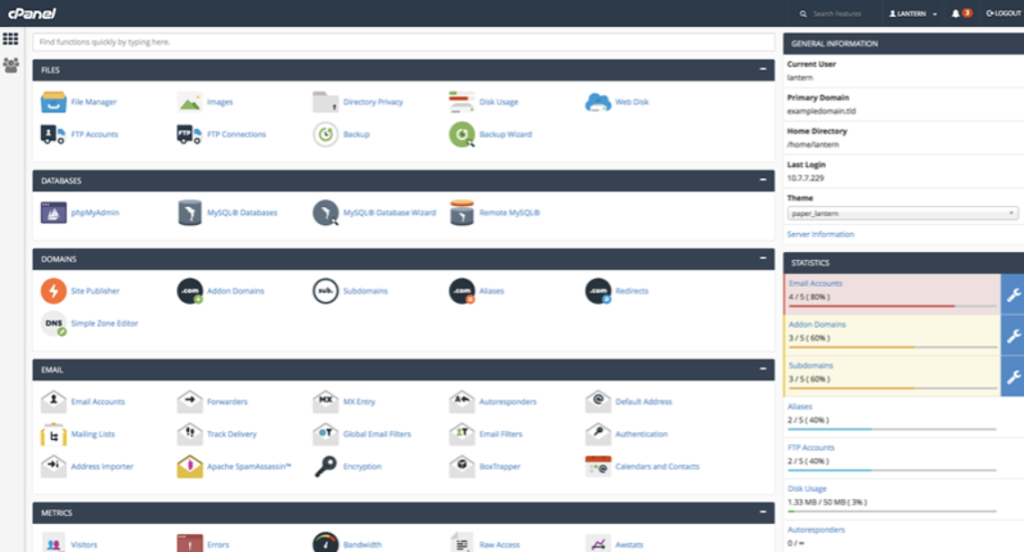
Credit: openalternative.co
Pricing And Affordability Comparison
Choosing the right control panel depends greatly on pricing and value. Both aaPanel and Plesk offer distinct pricing models. Understanding these helps users decide what fits their budget and needs. This section breaks down costs, licensing, and value for different users.
Aapanel’s Cost Structure And Value Proposition
aaPanel is known for its free and open-source approach. Users can install it without any licensing fees. This makes it an attractive option for small businesses and individual users.
Key points about aaPanel pricing:
- No cost for basic control panel features.
- Offers optional paid plugins for extra functionality.
- Helps reduce overall server management expenses.
- Ideal for users who want full control without recurring fees.
The value proposition lies in the freedom to customize and the absence of upfront costs. Users gain a robust control panel without worrying about monthly payments.
Plesk’s Pricing Tiers And Licensing Models
Plesk uses a tiered pricing system with different licenses based on features and server needs. This model suits businesses needing advanced tools and professional support.
| License Type | Key Features | Approximate Cost |
|---|---|---|
| Web Admin Edition | Basic website and server management | $10 – $15 per month |
| Web Pro Edition | Supports multiple websites, developer tools | $25 – $40 per month |
| Web Host Edition | Advanced reseller and hosting features | $50+ per month |
Licensing is subscription-based and varies with the number of domains or clients. Plesk includes professional support and regular updates in its paid plans.
Which Control Panel Offers Better Roi For Different Users
Small users and startups benefit from aaPanel’s free cost. It lowers initial investment and ongoing expenses.
Businesses needing advanced tools and support find Plesk’s pricing justified. The rich feature set can improve productivity.
- aaPanel suits personal projects and small servers.
- Plesk fits medium to large businesses with multiple sites.
- Plesk’s cost is offset by its comprehensive management features.
- aaPanel requires more hands-on management but saves money.
Choosing depends on budget, server complexity, and required features. Both offer solid returns but cater to different user needs.
Pros And Cons Based On Real-world Usage
Choosing the right hosting control panel depends on practical experience. Both aaPanel and Plesk offer distinct features that appeal to different users. Real-world usage reveals their strengths and weaknesses clearly. This section breaks down these points to help users decide which fits their needs best.
Strengths And Weaknesses Of Aapanel
aaPanel is known for its simplicity and ease of use. It targets users who want to manage servers without deep technical skills.
- Strengths:
- Free and open-source, lowering costs.
- Intuitive interface ideal for beginners.
- Supports multiple Linux distributions.
- Quick setup and lightweight.
- Includes one-click app installations like WordPress.
- Weaknesses:
- Limited support for Windows servers.
- Smaller community and fewer plugins than Plesk.
- Basic security features compared to premium control panels.
- Less suitable for large-scale enterprise hosting.
Strengths And Weaknesses Of Plesk
Plesk is a popular commercial control panel with many advanced features. It suits professional web hosting environments.
- Strengths:
- Supports both Linux and Windows servers.
- Robust security with active monitoring tools.
- Extensive plugin ecosystem and integrations.
- User-friendly interface with multi-language support.
- Strong customer support and regular updates.
- Weaknesses:
- Higher cost due to licensing fees.
- Can be resource-heavy on low-end servers.
- Steeper learning curve for beginners.
- Some advanced features locked behind premium plans.
User Feedback And Performance Insights
| Aspect | aaPanel | Plesk |
|---|---|---|
| Ease of Use | Very simple and clean interface. Ideal for beginners. | Feature-rich but more complex for new users. |
| Performance | Lightweight, fast on modest servers. | Reliable but requires more server resources. |
| Security | Basic security tools available. | Advanced security features with active protection. |
| Support | Community-based support, limited official help. | Dedicated support and extensive documentation. |
| Cost | Free to use. | Subscription-based pricing. |
User reviews highlight aaPanel for ease and affordability. Plesk scores high on features and security but at a cost. Performance varies by server setup and user needs.
Ideal User Scenarios For Aapanel And Plesk
Choosing the right hosting control panel depends on your specific needs and scale. aapanel and Plesk serve different user groups. Understanding their ideal scenarios helps in making the best choice. Both offer unique features suited for distinct environments and users.
Who Should Choose Aapanel: Small Businesses And Developers
aapanel fits well with small businesses and developers who want an easy-to-use, cost-effective control panel. It offers a simple interface for managing servers and websites. The panel supports key features like one-click app installations and server security.
- Small teams managing their own servers
- Developers testing projects on private servers
- Startups needing budget-friendly hosting management
- Users wanting quick deployment of websites and applications
aapanel’s lightweight design helps users avoid complex setups. Its open-source nature allows customization and flexibility. This makes it ideal for tech-savvy beginners and those with limited hosting budgets.
Who Should Opt For Plesk: Enterprises And Hosting Providers
Plesk targets enterprises and hosting providers requiring robust, scalable solutions. It supports multi-server management, advanced security, and extensive third-party integrations. This control panel suits environments with high traffic and complex hosting needs.
- Large companies managing multiple websites
- Web hosting providers offering services to clients
- Businesses needing strong security and compliance features
- Teams requiring automation and advanced server control
Plesk’s premium support and extensive toolset help manage complex infrastructures. Its user-friendly dashboard simplifies administration for large-scale operations.
Use Case Examples Highlighting Each Control Panel’s Strengths
| Scenario | aapanel | Plesk |
|---|---|---|
| Small E-commerce Website |
|
|
| Developer Testing Environment |
|
|
| Hosting Provider |
|
|
Conclusion: Making The Right Choice In 2025
Choosing between aaPanel and Plesk depends on your specific hosting needs. Both control panels offer solid features, but they serve different users. Understanding their strengths helps you pick the best fit for your projects.
Summary Of Key Differences And Benefits
| Feature | aaPanel | Plesk |
|---|---|---|
| User Interface | Simple and clean, easy for beginners | Professional, suited for advanced users |
| Pricing | Free and open-source options available | Paid licenses with various plans |
| Supported Platforms | Linux-based servers | Linux and Windows servers |
| Features | Basic server management, website setup, security tools | Advanced tools, multi-server management, extensions |
| Target Users | Small businesses, beginners, DIY website owners | Web professionals, agencies, large hosting providers |
Final Recommendations Based On User Needs
- Choose aaPanel if you want a free, simple control panel. Great for small servers and easy website management.
- Choose Plesk for advanced features and professional support. Ideal for businesses needing multi-server control and Windows compatibility.
- Consider your server type, budget, and skill level before deciding.
- Test both panels in a trial environment when possible.
Future Outlook For Aapanel And Plesk In The Control Panel Market
aaPanel continues to grow by focusing on ease of use and affordability. Its open-source nature attracts small businesses and hobbyists.
Plesk invests in expanding its feature set and cloud integration. It targets enterprises needing scalable and secure solutions.
Both control panels will keep evolving to meet changing hosting demands. Users benefit from ongoing updates and community support.

Credit: www.fiverr.com
Frequently Asked Questions
What Are The Key Differences Between Aapanel And Plesk?
Aapanel is a free, open-source control panel mainly for Linux servers. Plesk is a paid, feature-rich panel supporting multiple OS. Plesk offers advanced security and application management. Aapanel focuses on simplicity and essential hosting features.
Which Control Panel Is Better For Beginners, Aapanel Or Plesk?
Aapanel is more beginner-friendly due to its simple interface and free access. Plesk has a steeper learning curve but offers more tools for advanced users. Beginners often prefer Aapanel for quick setup and ease of use.
How Does Aapanel Compare To Plesk In Pricing?
Aapanel is completely free, making it ideal for budget-conscious users. Plesk requires a subscription, with pricing depending on features and licenses. Plesk’s cost reflects its extensive support and advanced functionalities.
Can Aapanel And Plesk Handle Multiple Websites Efficiently?
Both Aapanel and Plesk support hosting multiple websites effectively. Plesk offers better scalability and resource management for larger setups. Aapanel suits small to medium projects with straightforward management needs.
Conclusion
Choosing between aaPanel and Plesk depends on your needs and skills. AaPanel offers a simple, user-friendly way to manage servers. Plesk has more features but can feel complex for beginners. For easy setup and control, aaPanel suits many users well. Try aaPanel to see if it fits your hosting style. Explore its features here: aaPanel. Making the right choice helps keep your website running smoothly.