Are you tired of the usual Zoom experience? Maybe you want something simpler, faster, or packed with features that truly boost your online meetings.
What if you could host your remote meetings, courses, or events with ease, using a platform designed just for you? Meet Vivomeetings — a fresh alternative to Zoom that puts powerful tools like breakout rooms, polls, Q&As, and live chat right at your fingertips. Whether you’re connecting with colleagues, students, or clients, Vivomeetings makes video conferencing smooth and hassle-free. Keep reading to discover why this cloud-based platform might be exactly what your virtual gatherings need.
Introduction To Zoom Alternatives
Zoom has become a popular choice for online meetings and virtual events. Yet, many users seek other options to fit their unique needs. Alternatives to Zoom offer different features, pricing, and security levels. Exploring these options helps find the best match for your meetings, courses, or events.
Choosing the right platform can improve communication and productivity. It also ensures a smooth experience for all participants. Below, we discuss why people look for Zoom alternatives and what key features matter most.
Why Seek Alternatives To Zoom?
Several reasons push users to consider Zoom alternatives:
- Security concerns: Zoom faced criticism for privacy issues and meeting disruptions.
- Feature limitations: Some users need more advanced tools like breakout rooms and interactive polls.
- Cost: Free plans often have time limits or participant caps.
- User interface: Simple and easy-to-use platforms appeal to beginners and non-tech users.
- Compatibility: Support for multiple devices and operating systems is essential.
Overview Of Key Requirements: Security And User-friendliness
Security is a top priority for any video conferencing platform. Users want encrypted calls and strong access controls to protect sensitive information.
User-friendliness matters for smooth meetings. Platforms with clear layouts and easy navigation reduce confusion and save time.
| Requirement | What to Look For | Why It Matters |
|---|---|---|
| Encryption | End-to-end encryption or strong data protection | Protects meeting content from unauthorized access |
| Access Controls | Password protection, waiting rooms, user authentication | Keeps meetings secure and limits participants |
| Interface Design | Simple menus, clear buttons, minimal steps | Makes hosting and joining meetings easy |
| Device Support | Works on desktops, mobiles, tablets | Allows flexible participation from any device |
Top Secure And User-friendly Video Apps
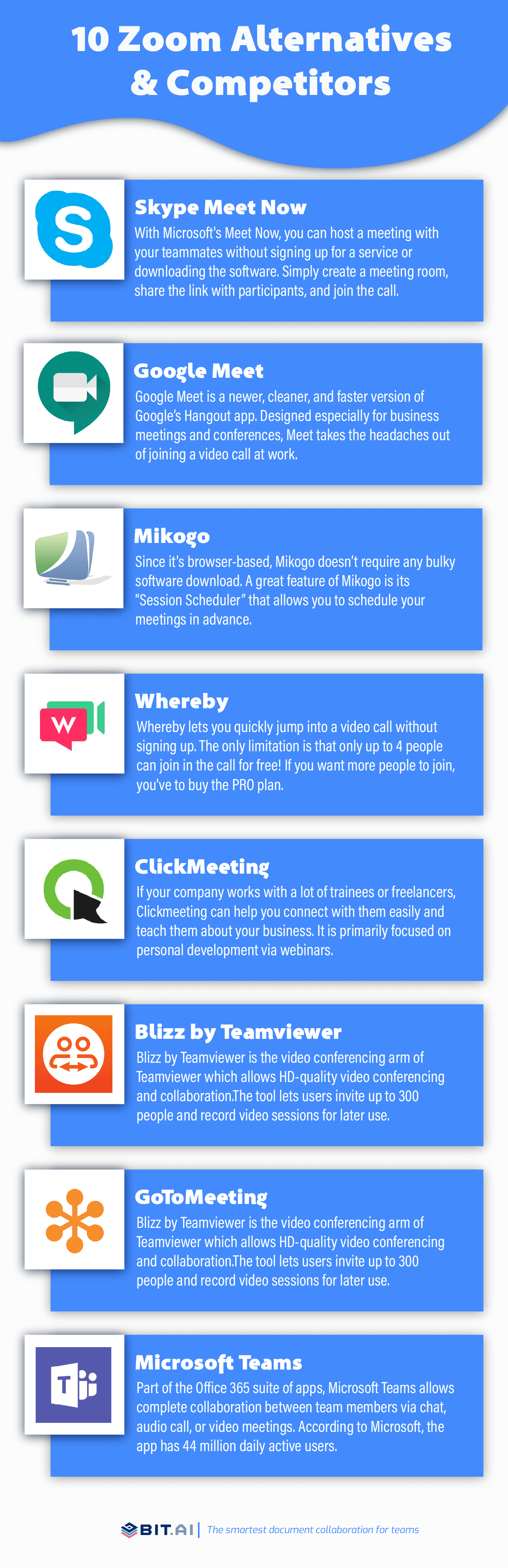
Choosing a video app that balances security and ease of use is vital for smooth communication. These apps protect your data while offering simple interfaces. They suit different needs, from enterprise meetings to casual calls. Below are some top options that combine strong encryption with intuitive design.
Microsoft Teams: Enterprise-grade Security With Seamless Collaboration
Microsoft Teams is built for businesses needing secure and reliable communication. It offers end-to-end encryption for calls and meetings. Users benefit from integrated collaboration tools like file sharing, calendars, and task management.
- Supports large team meetings and webinars
- Complies with industry security standards
- Works well with Microsoft 365 apps
Google Meet: Easy Integration With Google Workspace And Strong Encryption
Google Meet fits users who use Google Workspace daily. It ensures secure video calls with encryption in transit. The platform is easy to access via browsers or apps, requiring no extra downloads for many users.
- Integrates with Gmail, Calendar, and Drive
- Supports up to 250 participants
- Offers live captions and screen sharing
Signal Video Calls: Privacy-focused And Encrypted Communication
Signal prioritizes privacy and security. All calls are end-to-end encrypted, ensuring no third parties can listen. The app is simple and free, ideal for private, secure conversations.
- No data stored on servers
- Open-source security protocols
- Available on mobile and desktop
Jitsi Meet: Open-source Flexibility With End-to-end Encryption
Jitsi Meet is an open-source platform allowing users to run meetings without accounts. It supports end-to-end encryption and has customizable options for developers. The app is free and respects user privacy.
- No need to create an account
- Supports screen sharing and chat
- Can be self-hosted for more control
Cisco Webex: Robust Security Features For Professional Use
Cisco Webex offers strong security controls tailored for professional settings. Its encryption protects meetings and shared content. Features include meeting locks, waiting rooms, and host controls for privacy.
- Supports HD video and recording
- Integrates with calendar apps
- Complies with global security standards
Whereby: Simple Setup And User Experience With Gdpr Compliance
Whereby focuses on ease of use with no downloads needed. It runs directly in browsers and offers GDPR-compliant privacy. The platform suits small teams or casual meetings with straightforward controls.
- Room links are easy to share
- Supports up to 12 participants
- Includes screen sharing and recording
Key Features That Make These Apps Stand Out
Choosing the right alternative to Zoom means focusing on the features that improve your meeting experience. The best apps offer strong security, simple interfaces, and tools that help you work better together. These features ensure smooth communication and easy access, whether you are hosting a small team call or a large event.
End-to-end Encryption: Protecting Your Conversations
End-to-end encryption keeps your meetings private and secure. This feature means only participants can see and hear the conversation. Not even the app provider can access your data.
Apps with this security protect sensitive information from hackers and unauthorized users. It builds trust and confidence for all participants.
User Interface And Accessibility: Enhancing Ease Of Use
The best video apps have clean, simple user interfaces. Clear menus, big buttons, and easy-to-understand icons help users join meetings quickly.
- Accessible design supports users with disabilities.
- Minimal setup steps reduce confusion.
- Intuitive controls make hosting and joining calls smooth.
Good accessibility means anyone can use the app, no matter their skill level.
Cross-platform Compatibility: Staying Connected Anywhere
Apps that work across devices keep you connected wherever you are. Cross-platform compatibility means the app runs on Windows, Mac, iOS, Android, and even web browsers.
| Platform | Benefit |
|---|---|
| Desktop (Windows/Mac) | Full feature set, stable connection |
| Mobile (iOS/Android) | Join meetings on the go |
| Web Browser | No installation needed, instant access |
This flexibility allows users to switch devices easily during a meeting.
Integration With Productivity Tools: Streamlining Workflows
Integration with tools like calendars, email, and project management apps saves time. It automates scheduling, reminders, and follow-ups.
- Sync meetings with Google Calendar or Outlook.
- Share meeting links directly via email or chat.
- Connect with apps like Slack or Trello for task tracking.
These connections keep your workflow smooth without switching apps.
Customization And Scalability: Adapting To Different User Needs
Customization lets users set up meetings their way. Options include branding, layout changes, and feature controls.
Scalability means the app grows with your needs. From small team meetings to large webinars, the platform adjusts capacity and tools.
- Host breakout rooms for group discussions.
- Enable polls and Q&A for interactive sessions.
- Live chat supports real-time communication.
This flexibility suits businesses, educators, and event organizers alike.
Pricing And Affordability Breakdown
The cost of a video conferencing tool affects its appeal for users. Vivomeetings offers pricing that suits different needs. Understanding the price structure helps pick the best plan. This section breaks down what each option offers and its value.
Free Plans: What’s Included And Limitations
Vivomeetings provides a free plan with essential features. It is ideal for individuals or small groups starting out.
- Video, voice, and chat support
- Basic content sharing
- Limited meeting duration
- Access to breakout rooms, polls, and Q&A with restrictions
Limits include a cap on participants and meeting time. This plan suits casual users but may not fit larger or professional needs.
Subscription Tiers: Comparing Features And Costs
| Plan | Monthly Cost | Max Participants | Meeting Duration | Advanced Features |
|---|---|---|---|---|
| Basic | Free | 25 | 40 minutes | Standard breakout rooms, polls, QA |
| Pro | $14.99 | 100 | 24 hours | Unlimited recordings, advanced analytics |
| Business | $29.99 | 300 | 24 hours | Custom branding, priority support, enhanced security |
Higher tiers increase participant limits and add business tools. Pro suits growing teams. Business targets enterprises needing security and support.
Value For Money: Balancing Price With Security And Usability
Vivomeetings balances price with strong security and easy use. Each plan includes encryption and secure access.
The platform’s simple interface reduces training time. This saves money for organizations.
- Affordable pricing for small and large groups
- Security features at all levels
- Usability designed for all ages and tech skills
- Support available for paid plans
Users gain solid features without overspending. This makes Vivomeetings a practical Zoom alternative.
Pros And Cons Based On Real-world Usage
Choosing the right video conferencing tool depends on real-world experiences. Each platform has unique strengths and challenges. This section explores popular alternatives to Zoom, highlighting key benefits and drawbacks reported by users. Clear insights help you decide which tool fits your needs best.
Microsoft Teams: Strengths And Challenges
Strengths:
- Seamless integration with Microsoft 365 apps
- Strong collaboration tools including file sharing and chat
- Supports large meetings and webinars
- Reliable security and compliance features
Challenges:
- Can be complex for new users
- High resource usage may slow older devices
- Occasional notification delays reported
Google Meet: Advantages And Drawbacks
Advantages:
- Easy to use with Google Workspace integration
- No software installation needed; works in browsers
- Good video and audio quality for most users
- Supports captioning and screen sharing
Drawbacks:
- Limited advanced meeting controls
- Fewer customization options for meeting layouts
- Some users experience connection drops
Signal Video Calls: Benefits And Limitations
Benefits:
- End-to-end encryption ensuring strong privacy
- Simple interface with no ads or tracking
- Good for small, secure group calls
Limitations:
- Supports only up to 8 participants
- No advanced features like screen sharing or polls
- Dependent on mobile app; limited desktop support
Jitsi Meet: Pros And Cons From User Feedback
Pros:
- Open-source and free to use
- No account needed to join meetings
- Offers screen sharing and chat features
Cons:
- Video quality can vary based on server load
- Less polished user interface than paid platforms
- Limited customer support availability
Cisco Webex: Real-world Performance Insights
Performance Strengths:
- Strong video and audio quality
- Robust security and compliance certifications
- Good for large enterprise meetings
Performance Challenges:
- Setup process can be time-consuming
- Users report occasional software crashes
- Interface can feel cluttered for beginners
Whereby: User Experiences And Potential Issues
User Experiences:
- Browser-based, no downloads required
- Simple and intuitive design
- Effective for quick, small meetings
Potential Issues:
- Limited meeting duration on free plan
- Supports only up to 12 participants
- Occasional lag reported with video and audio
Credit: blog.bit.ai
Ideal Users And Use Cases For Each Alternative
Choosing the right Zoom alternative depends on the user’s needs and context. Different platforms serve various audiences better, based on features like security, ease of use, and customization. Understanding who benefits most from each tool helps in picking the best fit.
Business Professionals And Large Teams
Vivomeetings suits business professionals and large teams well. It supports breakout rooms, live polls, and Q&A sessions to manage interactive meetings efficiently. The cloud-based platform allows seamless video, voice, and content sharing, making collaboration smooth.
- Host company-wide webinars
- Conduct team brainstorming with breakout rooms
- Gather instant feedback via polls
- Use live chat for side conversations
Vivomeetings is easy to use, reducing setup time for busy professionals.
Privacy-conscious Individuals And Activists
Users who prioritize privacy need platforms with strong security. Alternatives offering end-to-end encryption and minimal data tracking stand out. While Vivomeetings focuses on accessibility and ease, privacy-focused platforms emphasize user control over data.
- Secure communication for sensitive discussions
- Minimal data retention policies
- Open-source or transparent security protocols
Such tools provide peace of mind for activists and privacy advocates.
Educational Institutions And Remote Learning
Vivomeetings fits well in education settings by offering tools tailored to remote learning:
- Breakout rooms for group projects
- Polls to check student understanding
- Q&A to encourage participation
- Live chat for immediate feedback
Teachers can easily manage online classes and engage students using these interactive features.
Casual Users And Small Group Meetings
For casual users, ease and simplicity matter most. Platforms with straightforward interfaces and quick setup are ideal. Vivomeetings offers a user-friendly experience that fits small group chats and social calls.
- Invite friends or family easily
- Use video and voice with minimal clicks
- Share content during informal meetings
This approach removes technical barriers for casual communication.
Tech-savvy Users Seeking Customization
Some users want advanced options and the ability to tweak settings. They prefer platforms offering:
- Custom integrations and APIs
- Flexible meeting controls
- Advanced audio/video settings
- Support for third-party apps
Vivomeetings focuses on ease, so tech experts may explore other alternatives for deep customization.
Conclusion: Choosing The Right Video App Alternative To Zoom
Choosing the best video app alternative to Zoom depends on several key factors. Each platform offers different features, security levels, and ease of use. Understanding these aspects helps you pick a tool that fits your personal or business needs.
Vivomeetings stands out as a strong option. It combines cloud-based video, voice, and chat with easy-to-use features like breakout rooms, polls, and Q&As. This makes hosting remote meetings, courses, and events simple and efficient.
Assessing Your Priorities: Security Vs. Usability
Security and usability often compete when choosing a video app. Some platforms focus heavily on encryption and data privacy. Others prioritize a smooth, simple user experience.
- Security: Look for end-to-end encryption, secure logins, and data protection policies.
- Usability: Consider an intuitive interface, easy setup, and support for multiple devices.
Vivomeetings balances both by offering secure cloud-native video meetings with a straightforward user interface. This balance suits businesses and educators needing privacy without complexity.
Making An Informed Decision Based On Needs And Budget
Start by listing your must-have features and budget limits. Common needs include:
- Number of participants per meeting
- Availability of breakout rooms and interactive tools
- Device compatibility and mobile support
- Customer support and training resources
Vivomeetings offers a cost-effective solution with a rich feature set for groups of various sizes. Its pricing plans cater to individual users, businesses, and educational institutions.
| Feature | Vivomeetings | Typical Zoom Alternative |
|---|---|---|
| Breakout Rooms | Yes | Yes |
| Polls & QA | Included | Often Paid Add-on |
| Cloud-native Video | Yes | Varies |
| Pricing | Affordable Plans | Wide Range |
Future Trends In Secure And User-friendly Video Communication
Video communication evolves with new technology and user demands. Trends include:
- Stronger security protocols to protect privacy and data.
- AI enhancements for noise cancellation and real-time transcription.
- Improved accessibility across devices and internet speeds.
- Integrated collaboration tools for seamless teamwork.
Platforms like Vivomeetings are adapting by combining security with usability. They aim to deliver smooth, secure experiences for all users.

Credit: dev.to

Credit: zapier.com
Frequently Asked Questions
What Are The Best Alternatives To Zoom For Video Calls?
Popular alternatives to Zoom include Microsoft Teams, Google Meet, and Cisco Webex. These platforms offer similar video conferencing features with added collaboration tools and strong security measures.
How Do Zoom Alternatives Compare In Pricing?
Many Zoom alternatives offer free plans with limited features. Paid plans vary, often providing more participants, longer meeting times, and advanced options at competitive prices.
Which Zoom Alternative Is Best For Business Meetings?
Microsoft Teams is ideal for business meetings due to its integration with Office 365. It supports collaboration, file sharing, and team chats alongside video conferencing.
Are There Free Zoom Alternatives With No Time Limits?
Yes, Google Meet offers free video calls without time limits for one-on-one meetings. It also supports group calls with a 60-minute limit on the free plan.
Conclusion
Finding the right tool for online meetings matters a lot. Vivomeetings offers simple video, voice, and chat features. It supports breakout rooms, polls, and live Q&A sessions. This platform works smoothly on many devices and is easy to use. It fits well for businesses, teachers, and anyone hosting events online. Try exploring what Vivomeetings can do for your virtual meetings. Learn more about it here: Vivomeetings.