Are you struggling to keep your team connected and productive? Choosing the right collaboration tool can make all the difference.
You’ve probably heard of Slack, a popular platform known for its chat and integration features. But what if there’s a better way to bring all your tasks, files, video calls, chats, docs, and stories into one seamless workspace? That’s where Edworking steps in. If you want to know which tool suits your workflow best and how you can boost your team’s efficiency effortlessly, keep reading. This Edworking vs Slack comparison will help you make the smartest choice for your team’s success.
Introduction To Edworking And Slack
Teams need strong tools to work well together. Edworking and Slack offer different ways to help teams connect and manage tasks. Both platforms aim to improve communication and productivity, but they do this in unique ways. Understanding their features helps teams choose the right tool for their needs.
Overview Of Edworking As A Team Collaboration Tool
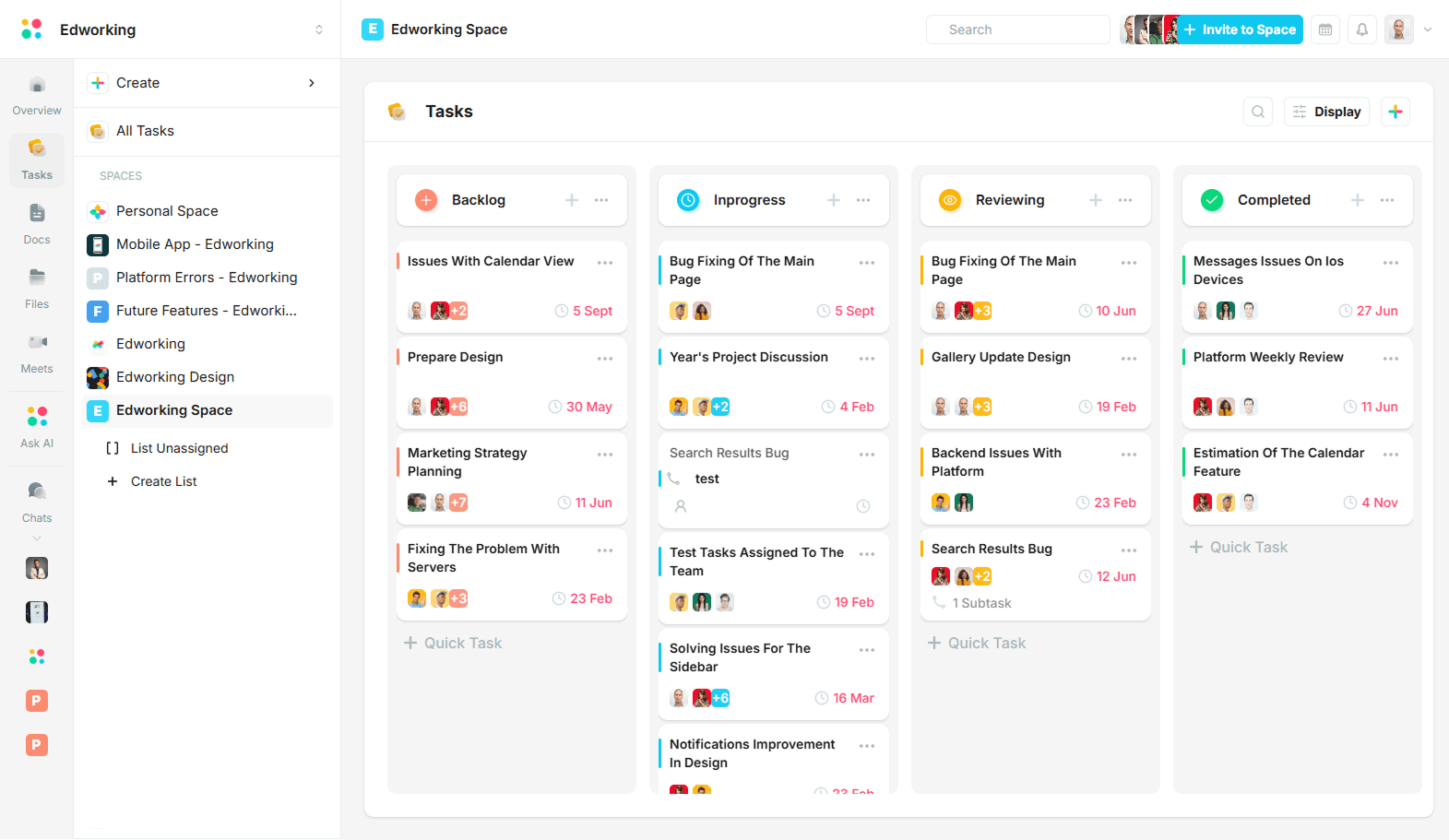
Edworking combines many work features into one platform. It brings together tasks, files, video calls, chats, documents, and stories. This integration helps teams keep everything in a single place.
- Task management with clear tracking
- File sharing for easy access
- Built-in video calls for real-time meetings
- Chat options for quick communication
- Document collaboration and story creation
Edworking focuses on making teamwork simple by reducing the need for multiple apps. Teams can plan, share, and talk without switching tools.
Overview Of Slack And Its Market Position
Slack is a popular messaging platform for teams. It mainly focuses on chat-based communication with channels for different topics or groups. Slack supports many integrations with other tools.
- Organized channels for team discussions
- Direct messaging for private talks
- File sharing with chat context
- Wide range of third-party app integrations
- Strong focus on real-time messaging
Slack holds a leading market position as a flexible communication hub. It is widely used by businesses of all sizes to keep teams connected.
Purpose And Scope Of The Comparison
This comparison aims to help teams decide between Edworking and Slack. It looks at their features, ease of use, and how they support teamwork.
- Compare core collaboration tools
- Evaluate communication options
- Review integration and file management
- Assess user experience and pricing
Understanding these points helps teams choose a tool that fits their workflow and improves productivity.

Credit: edworking.com
Key Features Of Edworking
Edworking combines multiple work tools into one platform. It helps teams manage projects, collaborate on documents, automate tasks, and communicate easily. This all-in-one solution saves time and keeps work organized. Below are the key features that make Edworking stand out.
Integrated Project Management And Task Tracking
Edworking offers a clear and simple way to manage projects and tasks. Teams can create projects, assign tasks, and set deadlines all in one place. The task tracking system shows progress in real time.
- Create and assign tasks quickly
- Set priorities and due dates
- Track progress with visual boards and lists
- Receive notifications about task updates
This feature helps teams stay focused and meet deadlines without switching apps.
Real-time Document Collaboration And Editing
Editing documents together is easy with Edworking. Multiple users can work on the same file at once. Changes appear immediately for everyone.
- Edit text, add comments, and make suggestions
- Keep document versions saved automatically
- Access files from anywhere, anytime
- Share documents with team members securely
Teams can avoid confusion and improve accuracy by working on live documents.
Customizable Workflows And Automation
Edworking allows teams to build workflows that fit their needs. Users can automate repetitive tasks to save time and reduce errors.
| Workflow Feature | Benefit |
|---|---|
| Drag-and-drop workflow builder | Design processes easily without coding |
| Task automation rules | Auto-assign, notify, or update tasks |
| Custom triggers and actions | Match workflows to team needs |
Custom workflows increase efficiency and keep work consistent.
Built-in Video Conferencing And Communication Tools
Edworking includes video calls and chat features inside the platform. Teams can discuss work without extra apps.
- Start video meetings with one click
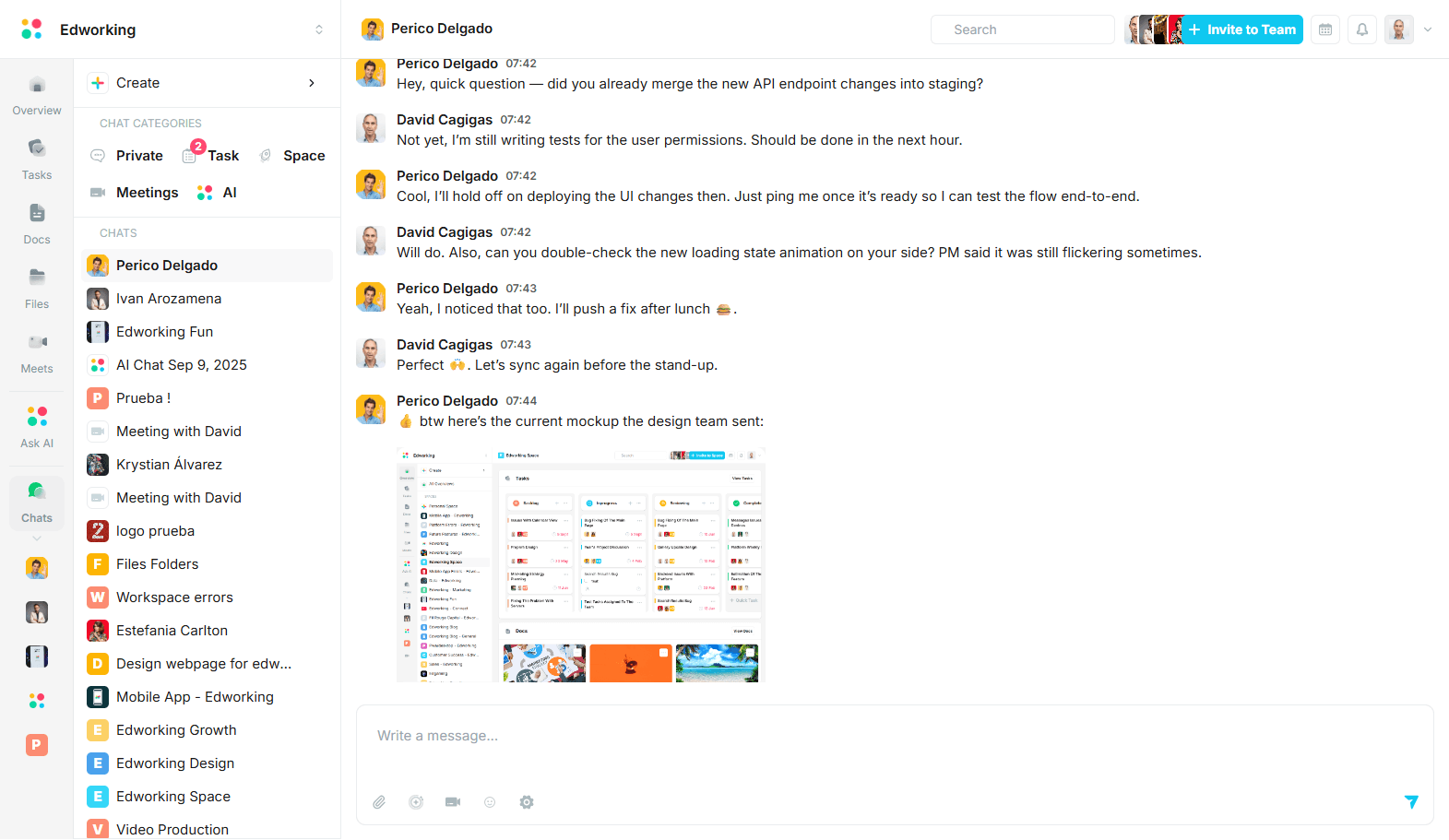
- Chat in real time with individuals or groups
- Share screens during calls for clear explanations
- Keep all communication linked to projects and tasks
These tools make teamwork smoother and reduce delays in communication.
Key Features Of Slack
Slack offers a range of features designed to enhance team communication and collaboration. Its tools help teams stay organized, connect easily, and manage work efficiently. These features support smooth workflows and reduce the time spent searching for information.
Channels And Direct Messaging For Organized Communication
Slack uses channels to group conversations by topic, project, or team. Channels keep discussions focused and easy to follow. Team members can join channels relevant to their work.
Direct messaging allows private one-on-one or small group chats. This helps share quick updates or sensitive information without cluttering channels.
- Public and private channels available
- Threaded replies to keep conversations clear
- Mentions and reactions to highlight important messages
Extensive Third-party App Integrations
Slack supports integration with many popular apps and services. These apps bring extra tools right inside Slack, reducing the need to switch platforms.
Common integrations include:
- Google Drive for file sharing
- Trello and Asana for task management
- Zoom and Microsoft Teams for video calls
- GitHub and Jira for developer workflows
Integrations help automate tasks and centralize information.
Powerful Search And Archiving Capabilities
Slack’s search feature quickly finds messages, files, and links. It indexes all conversations and documents, making past work easy to retrieve.
Users can filter searches by:
- Channel or direct message
- Date range
- People involved
- File types
Slack also archives all content securely, keeping team history accessible.
Custom Notifications And Workflow Automation
Slack allows users to customize notifications by channel or keyword. This reduces distractions and highlights important updates.
The platform supports workflow automation using built-in tools like Slack Workflow Builder. Teams can create simple automations such as:
- Sending welcome messages to new members
- Automating reminders and follow-ups
- Triggering alerts based on specific events
These features save time and keep workflows smooth.
Pricing And Affordability Breakdown
Choosing the right collaboration tool often depends on its pricing and value for money. This section compares Edworking and Slack on their pricing plans. It helps teams understand which platform fits their budget and needs best. Clear pricing details and feature sets allow easier decisions for small to large teams.
Edworking Pricing Tiers And Value For Money
Edworking offers straightforward pricing with features aimed at improving team collaboration. Here are the main tiers:
| Plan | Price (per user/month) | Key Features |
|---|---|---|
| Free | $0 | Basic chat, file sharing, limited tasks, video calls |
| Pro | $8 | Unlimited tasks, advanced video calls, docs, and stories |
| Business | $15 | Team management, priority support, enhanced security |
Edworking’s pricing is simple and competitive. The Pro plan offers a great balance of features and cost. This suits growing teams needing more than basic collaboration. The Business plan targets larger teams with added controls and support.
Slack Pricing Plans And Cost-effectiveness
Slack provides several pricing options based on team size and needs. Its plans include:
| Plan | Price (per user/month) | Key Features |
|---|---|---|
| Free | $0 | Access to 10,000 messages, 1:1 voice/video calls |
| Pro | $7.25 | Group calls, unlimited message archive, app integrations |
| Business+ | $12.50 | Advanced identity management, compliance tools |
Slack’s plans cater to teams that need extensive integrations and message history. Its Pro plan is slightly cheaper than Edworking’s Pro but offers fewer native features like document collaboration.
Comparative Analysis Of Cost Vs Features For Teams
- Free Plans: Both offer free tiers. Edworking’s free plan includes video calls and document collaboration. Slack limits video calls and message history.
- Mid-Level Plans: Edworking’s Pro plan costs $8 and adds robust task and doc features. Slack’s Pro at $7.25 focuses on messaging and integrations.
- High-Level Plans: Edworking Business includes team management and priority support. Slack Business+ adds security and compliance tools for larger teams.
Teams needing an all-in-one workspace with tasks, files, and calls might find Edworking better value.
Slack suits teams that prioritize messaging and third-party app integrations.
| Factor | Edworking | Slack |
|---|---|---|
| Video Calls | Included in Free and Paid | Limited in Free, Group calls in Paid |
| Task Management | Built-in and advanced in Paid | Requires external apps |
| Message History | Unlimited in Paid | 10,000 messages Free, Unlimited Paid |
| Price per User | $0 to $15 | $0 to $12.50 |
Pros And Cons Based On Real-world Usage
Understanding the strengths and limitations of Edworking and Slack helps teams choose the right tool. Both platforms offer unique features that suit different workflows. Real users share insights about how these tools perform in daily tasks and team communication.
Strengths And Limitations Of Edworking In Team Collaboration
Edworking combines tasks, files, videocalls, chats, docs, and stories in one platform. This integration reduces the need to switch between apps.
- Strengths:
- All-in-one workspace centralizes communication and project management.
- Easy to track tasks and conversations in one place.
- Built-in videocalls improve remote collaboration without extra apps.
- Supports document creation and sharing inside the platform.
- Limitations:
- User interface can feel cluttered for new users.
- Less third-party app integration compared to Slack.
- Some users report occasional slow loading times with large files.
- Smaller community means fewer tutorials and plugins.
Strengths And Limitations Of Slack In Different Work Environments
Slack is known for its robust messaging and integration options. It adapts well to many team sizes and industries.
| Strengths | Limitations |
|---|---|
|
|
User Feedback And Common Pain Points
Users of both platforms share common praises and frustrations.
- Edworking: Appreciated for task and communication unification but criticized for occasional lag.
- Slack: Loved for integrations but users find message overload distracting.
- Both tools face challenges in onboarding new users smoothly.
- Many prefer combining Slack with other apps, while Edworking aims to be a single solution.
Teams should weigh these factors based on their size, work style, and tool preferences.
Ideal Users And Use Case Recommendations
Choosing the right collaboration tool depends on your team’s needs and work style. Edworking and Slack serve different purposes. Understanding who benefits most from each helps pick the best fit.
Which Teams Benefit Most From Edworking’s Features
Edworking suits teams needing a central hub for all work activities. It combines tasks, files, videocalls, chats, docs, and stories in one place.
- Remote or hybrid teams that want fewer apps and easy access to all work tools.
- Project-focused teams requiring task management alongside communication.
- Teams that value integrated video calls without switching apps.
- Groups handling documents and stories collaboratively within the same platform.
Edworking helps reduce app switching and keeps work organized in one place.
Best Scenarios For Slack’s Communication-centric Approach
Slack excels in teams that prioritize fast, flexible communication. Its core strength is real-time chat and channel organization.
- Large teams needing many channels for different topics or projects.
- Teams that rely on integrations with many third-party apps.
- Customer support and sales teams requiring quick messaging and notifications.
- Groups that value informal, instant conversations alongside file sharing.
Slack’s chat-first design boosts quick discussions but requires other tools for tasks and docs.
Choosing The Right Tool Based On Team Size, Industry, And Workflow
| Factor | Edworking | Slack |
|---|---|---|
| Team Size | Small to medium teams benefit from all-in-one features. | Medium to large teams prefer flexible channel organization. |
| Industry | Creative, project management, education, and remote work. | Tech, customer support, marketing, and fast-paced environments. |
| Workflow | Structured workflows needing task tracking and document collaboration. | Communication-heavy workflows with many app integrations. |
Choosing depends on whether your team needs a unified workspace or a communication-first platform.
Conclusion: Making The Right Choice For Your Team
Choosing the best collaboration tool impacts your team’s productivity and communication. Both Edworking and Slack offer unique features. Understanding their differences helps your team work smoothly and stay organized. This section breaks down key points to guide your decision.
Summary Of Key Differences And Strengths
| Feature | Edworking | Slack |
|---|---|---|
| All-in-One Workspace | Combines tasks, files, videocalls, chats, docs, and stories | Focuses mainly on messaging and integrations |
| User Interface | Simple and organized for multitasking | Clean but can get cluttered with many channels |
| Communication | Supports chats and video calls within one platform | Strong messaging features with many app integrations |
| Task Management | Built-in task and document management | Relies on third-party apps for tasks and docs |
| Best for | Teams needing a unified workspace for all activities | Teams wanting powerful messaging and app connections |
Final Thoughts On Which Tool Excels In Specific Collaboration Needs
Edworking suits teams that want to handle everything in one place. It reduces switching between apps. Task tracking, video meetings, and documents live together. This keeps work organized and simple.
Slack shines in real-time messaging and app integrations. It works well for teams relying on fast chat and many third-party tools. Slack’s large user base means many add-ons and custom options.
Choose Edworking for a streamlined, all-in-one experience. Pick Slack for rich chat and flexible integrations.
Next Steps For Teams Considering Edworking Or Slack
- Identify your team’s main needs: communication, tasks, or both.
- Test free versions of Edworking and Slack to explore features.
- Ask team members for feedback on ease of use and workflows.
- Compare pricing plans based on team size and required tools.
- Decide which platform best fits daily work habits and goals.
Trialing both tools helps find the best match. Clear needs and user input guide a smart choice.
Credit: edworking.com
Credit: edworking.com
Frequently Asked Questions
What Are The Main Differences Between Edworking And Slack?
Edworking focuses on educational collaboration, while Slack targets workplace communication. Edworking offers tools for learning management. Slack excels in team messaging and integration with work apps. Both improve communication but serve different user needs effectively.
Which Platform Suits Remote Teams Better, Edworking Or Slack?
Slack is ideal for remote work teams due to its real-time messaging and app integrations. Edworking suits remote educational groups needing collaboration on learning content. Choice depends on whether the team prioritizes work communication or educational collaboration.
Can Edworking Replace Slack For Business Communication?
Edworking is designed for education, not business communication. Slack offers robust tools for business messaging, project management, and integrations. For business use, Slack remains the preferred platform over Edworking.
How Do Edworking And Slack Handle File Sharing?
Both platforms support file sharing, but Slack offers more advanced features. Slack allows seamless sharing, searching, and integration with cloud storage. Edworking’s file sharing is tailored for educational content and assignments.
Conclusion
Choosing between Edworking and Slack depends on your team’s needs. Edworking combines tasks, files, videocalls, chats, docs, and stories in one place. Slack focuses mainly on messaging and app integrations. For teams wanting an all-in-one workspace, Edworking fits well. It keeps work organized and easy to access. Explore how Edworking can help your team collaborate better by visiting this link. Simple tools lead to smoother teamwork. Consider what matters most for your daily work flow.